Accessibility is widely recognized as a moral, legal and social responsibility in digital design. Governments mandate it, organizations publish accessibility statements, and design teams apply accessibility guidelines during development. These efforts have improved many aspects of digital interaction. Text can be read by screen readers, images carry descriptive labels, and interfaces support keyboard navigation. For people with visual or motor impairments, these improvements are essential.
Yet many people still meet barriers in systems that technically comply with accessibility standards. The interface is readable, navigation works, and assistive technologies behave as intended, but the system is still hard to understand. The problem lies not in sensory access but in conceptual alignment, and this is where cognitive distance enters the conversation about accessibility.
5.1 The Evolution of Digital Accessibility
Accessibility emerged from civil rights movements
The modern accessibility movement grew out of broader struggles for equal participation in public life. Advocates argued that physical spaces, public services and institutions should be designed so that people with disabilities could take part fully in society. In the United States these principles were codified in the Americans with Disabilities Act of 1990, which required public and private institutions to remove barriers that kept people with disabilities from services and facilities (United States Congress 1990). As daily life moved online, the same principles extended into digital environments, and websites, applications and online services gradually became subject to accessibility requirements.
The rise of web accessibility standards
To guide designers and developers, international bodies created formal standards for digital accessibility. The most widely recognized is the Web Content Accessibility Guidelines (WCAG), developed by the World Wide Web Consortium (W3C Web Accessibility Initiative 2023b). WCAG organizes accessibility around four principles: content should be perceivable, interfaces operable, information understandable, and systems robust enough to work across technologies. Many governments and institutions now require conformance, and the framework has substantially improved the accessibility of digital services.
Accessibility successes and limitations
These standards have produced real gains. Screen readers let blind and partially sighted people navigate websites, captions give deaf people access to video, and keyboard navigation helps people who cannot use a mouse. In practice, though, accessibility evaluation tends to focus on technical conformance. Teams check that images have alt text, that color contrast meets the required ratio, and that every interactive element can be reached from the keyboard. These checks are necessary, but they do not reach deeper conceptual barriers. A system can meet every technical requirement while presenting information in ways many people find hard to interpret. Cognitive distance explains why.
5.2 Accessibility Beyond Sensory Barriers
Cognitive accessibility remains underexplored
Visual and motor accessibility receive most of the attention; cognitive accessibility has historically been harder to define. Cognitive barriers arise when systems demand forms of reasoning or memory that many people find difficult. They affect people with learning disabilities, people experiencing cognitive fatigue, older adults navigating unfamiliar technology, and anyone using a system under stress or time pressure. Even people with no diagnosed condition meet them when systems present complex structures or unfamiliar terminology. Accessibility frameworks increasingly recognize these issues (W3C Web Accessibility Initiative 2023a), but practical methods for addressing them remain far less developed than those for sensory access.
Complexity as a hidden barrier
Many digital services assume that people can easily navigate hierarchies, interpret administrative terminology and remember multi-step processes. Those assumptions do not always hold. Consider an online government service that requires citizens to pass through several nested categories before reaching the right form. Each step may be technically accessible and work perfectly with assistive technology, yet the structure may still be hard to interpret, because users must understand the administrative logic of the organization providing the service. When that logic differs from how citizens think about their own needs, confusion follows. The system is accessible in a technical sense while remaining conceptually distant.
Cognitive overload versus cognitive distance
Discussions of cognitive accessibility usually focus on overload. Interfaces that present too much at once overwhelm people, particularly those with attention or memory limitations, so guidelines encourage less clutter and simpler layouts. These practices help, but overload and distance are different problems. A system can present very little information and still require people to interpret an unfamiliar conceptual structure. The difficulty then lies not in the quantity of information but in the mismatch between how the system is organized and how people reason. Reducing visual complexity does not solve it. Addressing cognitive distance means examining how systems represent tasks and information in the first place.
5.3 Accessibility in Public Systems
Government services and structural complexity
Public service platforms often reveal the consequences of cognitive distance more clearly than commercial products. Government systems are typically built around administrative categories rather than everyday goals. A citizen simply wants to renew a license, apply for a benefit or report a change of address, but the system is organized by department. They must first work out which agency handles the service and then pass through procedural steps that each reflect internal logic. Public administration researchers describe the cumulative cost of this as administrative burden: the learning, compliance and psychological costs that institutions shift onto the people they serve (Moynihan, Herd, and Harvey 2015; Herd and Moynihan 2018). Recent work shows that bureaucratic language in digital public encounters measurably affects how citizens understand and respond to them (Li and Liu 2025). Even when these systems conform to accessibility guidelines, many citizens struggle with them, and the problem lies less in technical accessibility than in conceptual misalignment.
Healthcare portals and patient understanding
Healthcare platforms offer another example. Many hospitals and clinics now provide portals where people can view test results, book appointments and message clinical staff. These systems improve access to personal health information, yet reviews of the research have found that patients’ ability to understand and act on what they see is uneven, and that health literacy shapes who benefits (Irizarry, DeVito Dabbs, and Curran 2015). Medical terminology, complex data displays and fragmented workflows all create confusion. A patient may log in and navigate every page successfully and still be unsure what the information actually means. Here cognitive distance affects not only usability but health outcomes, since misreading medical information can influence treatment decisions and confidence.
Digital inclusion requires conceptual alignment
As governments and institutions rely more on digital systems, accessibility becomes inseparable from digital inclusion. If citizens cannot understand how a system works, they may be excluded from services that are technically available to them. This form of exclusion is subtle. The system appears open to everyone, but people who cannot bridge the conceptual gap abandon the process or depend on intermediaries to complete it for them. Reducing cognitive distance is therefore part of inclusive design. Accessibility is not only about enabling interaction; it is about enabling understanding.
5.4 Externalized Processing: When Systems Hand Their Work to Users
Some of the clearest examples of cognitive distance appear in tasks that look trivial. Consider a document submission form, the kind used to upload an identity card for a bank account, a medical report for an insurance claim, or proof of address for a public service.
From the system’s side, the requirements are simple and precise. The file must be a PDF, JPG or PNG. It must be under two megabytes. It may need a particular name or a single page. From the user’s side, the same requirements arrive as a sequence of implicit challenges. A format requirement assumes the person knows what a file format is, how formats differ and how to convert between them. A size limit assumes they know what file size represents and how to change it. Before the person can decide whether to perform the required action, they must first understand what the action means.
What people do next is revealing. They search for online converters, install compression apps, photograph the document again at a lower resolution, or send the file to themselves through a messaging app because they have noticed it makes images smaller. Call this observable behavior user-side preprocessing. It is a workaround for a design decision: the system could reasonably convert, compress or normalize the file itself, within its technical, legal and security constraints, but instead it filters input and rejects what does not fit (Cavalcanti 2026a; Zaheri, Famelis, and Syriani 2025).
This book uses two terms for the pattern. Externalized processing is the allocation of reasonably automatable transformation work to users rather than to the system. It does not cover the input people necessarily provide to state their intent, supply source material or authorize an action; it refers only to avoidable work the system could absorb but does not. Constraint without accommodation names the interaction pattern that results: the system states the conditions valid input must meet but offers no internal means of meeting them. Figure 5.1 pictures the transfer.
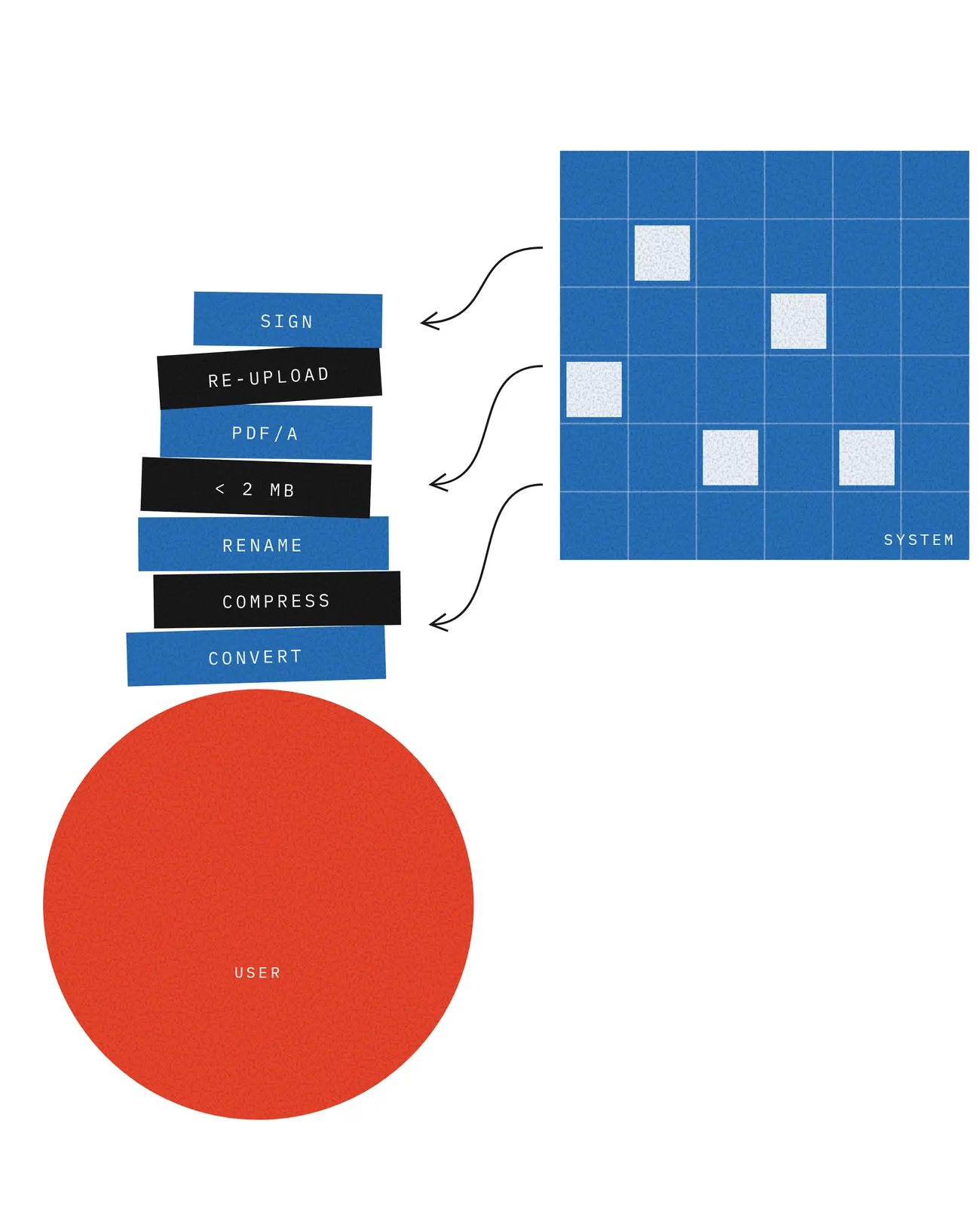
Externalized processing raises both cognitive load and cognitive distance, and it does so unevenly. A user with technical experience mostly experiences extra effort: they understand what is wanted and spend time producing it. A user without that experience mostly experiences distance: they do not know what the system is asking, how to comply, or why their last attempt failed, and more effort does not help, because what they lack is a conceptual basis for acting. The pattern therefore falls hardest on the people accessibility standards are meant to protect, while passing every technical conformance check.
The research behind this book states the relationship as a proposition rather than a tested result: systems that externalize automatable preprocessing without explanation or built-in assistance are likely to show higher cognitive distance, visible as lower predictive accuracy, lower interaction confidence and lower conceptual transparency (Cavalcanti 2026a). Those three terms are dimensions of the measurement instrument introduced in Chapter 6.
Seen more broadly, externalized processing is one instance of a general move: the transfer of interpretive work from systems to users. A status code in place of a status explanation hands the user the job of translating the code. An administrative stage label in place of a next step hands them the job of decoding institutional logic. Chapter 8 returns to the design response, which can be stated in two words: internalize explanation.
Accessibility debt
Because distance is cumulative, its costs behave less like isolated defects and more like debt. Each design decision that leaves a small interpretive barrier in place may be tolerable on its own. Together they compound across workflows, resist late remediation, and produce systems from which many people are effectively excluded even though every screen passes review. Earlier work in this research program calls this accessibility debt (Cavalcanti 2026b). Like technical debt, it is cheapest to avoid at design time, it grows quietly, and it is eventually paid, usually by the users least able to afford it and by the support teams who answer their calls.
5.5 Rethinking Accessibility Through Cognitive Distance
The accessibility movement has made remarkable progress against sensory and physical barriers. The next step is to extend its focus to conceptual barriers, and cognitive distance offers a framework for doing so. Beyond asking whether people can reach interface elements, designers must ask whether people can build meaningful mental models of the system. Does its structure reflect how people think about their goals? Do its labels match the language people use? Do its workflows follow the logic of the real-world task, and does it do the work it reasonably can instead of handing that work to the user? When these questions guide design, accessibility expands beyond technical compliance and becomes a matter of conceptual alignment between systems and the people who rely on them. Table 5.1 shows how this lens complements usability and accessibility rather than replacing them.
| Usability | Accessibility | Cognitive distance | |
|---|---|---|---|
| Primary question | Is the task easy to perform? | Can diverse users access and operate the system? | Does the system’s logic match how users think? |
| Typical measures | Time on task, completion rate, error count | Conformance checks, assistive technology compatibility | Prediction accuracy, explanation quality, confidence, hesitation |
| Blind spot | Efficient performance can hide shallow understanding | Technical compliance can hide conceptual confusion | Effort and access problems if measured alone |
| Design implication | Reduce friction in actions | Remove exclusion barriers | Align structure, language and feedback with human reasoning |